
The Instant e-PAN service allows individuals to quickly obtain a PAN card online without the need for lengthy paperwork or physical documentation. This service, provided by the Income Tax Department, is especially useful for those who need a PAN card urgently for financial transactions or tax purposes.
This guide will walk you through registering for a new e-PAN, checking the status of your PAN application, and downloading the e-PAN card.
What is an Instant e-PAN?
An Instant e-PAN is an electronically issued PAN card that is equivalent to a physical PAN card. It’s a quick and paperless way to obtain your PAN, and it is free of cost.
The Instant PAN service was launched by the Indian government on February 7, 2020. This service allows individuals to obtain a PAN (Permanent Account Number) instantly using their Aadhaar number.
Eligibility
Not everyone is eligible for the instant e-PAN service. Here are the basic requirements:
- New Applicants: This service is only available for individuals applying for a PAN card for the first time. If you already have a PAN card or need to make corrections, this service is not applicable.
- Aadhaar-Linked Mobile Number: Applicants must have a valid Aadhaar card, and their mobile number must be linked to it, as the verification process is done through OTP (One-Time Password) sent to the registered mobile number.
- Resident Individuals: The service is only available for resident individuals, not for entities like companies, firms, or HUFs (Hindu Undivided Families).
- No Modifications: This service is for first-time PAN applicants only. Individuals looking to make changes or updates to their existing PAN card cannot use this service.
Also, Not be a “representative assessee” under section 160 of the Income Tax Act.
Register for Instant e-PAN
The process of applying for an instant e-PAN is quick and easy. Here are the steps:
- Step 1: Access the e-filing portal by going to the Income Tax Department’s e-filing portal.
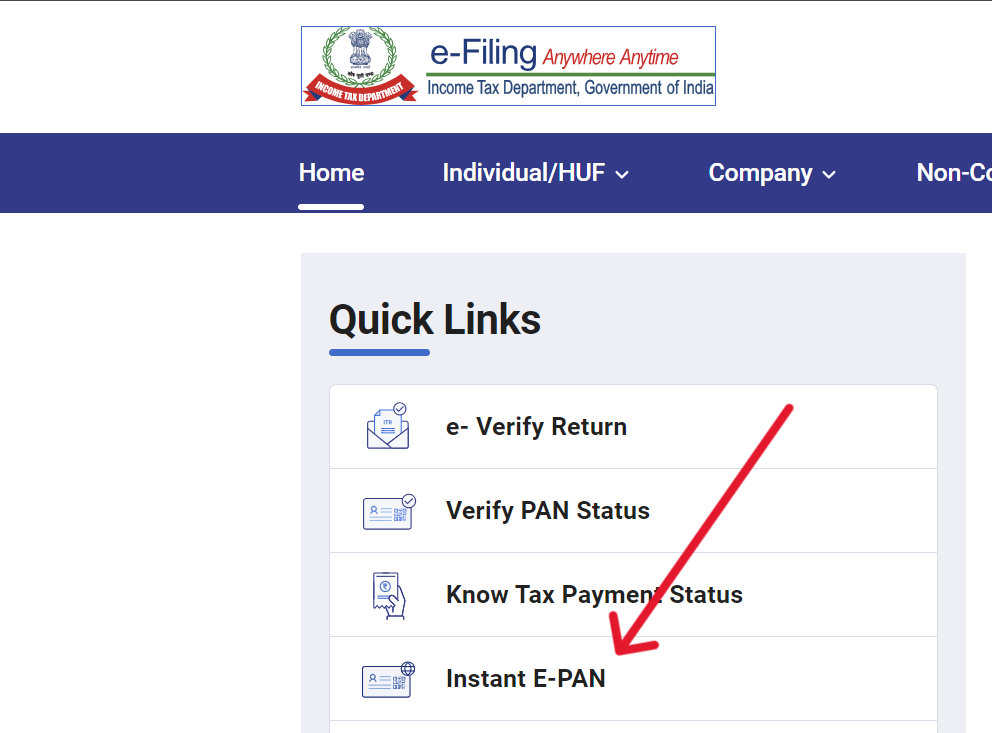
- Step 2: On the homepage, click on the “Instant E-PAN” button.
- Step 3: On the new page, select the “Get New e-PAN” option. Enter your 12 digit Aadhaar number for PAN allotment.
- Step 4: Now, a 6-digit OTP (One-Time Password) will be sent to the Aadhaar linked mobile number. Validate the OTP received to authenticate your details and proceed further.
After validating your Aadhaar, you can generate your instant PAN easily
Check e-PAN Application Status and Download
You can download and check the status of your e-PAN on the Income Tax e-filing portal, either by logging in or without logging in. Below, we have discussed the whole process.
Before Login
- Step 1: Go to the e-Filing portal homepage and click on “Instant e-PAN.”
- Step 2: On the new page, click on “Check Status/Download PAN.”

- Step 3: Enter your Aadhaar number and captcha code, then click “Continue.”
- Step 4: Enter the OTP received on your registered mobile number and click “Continue.”

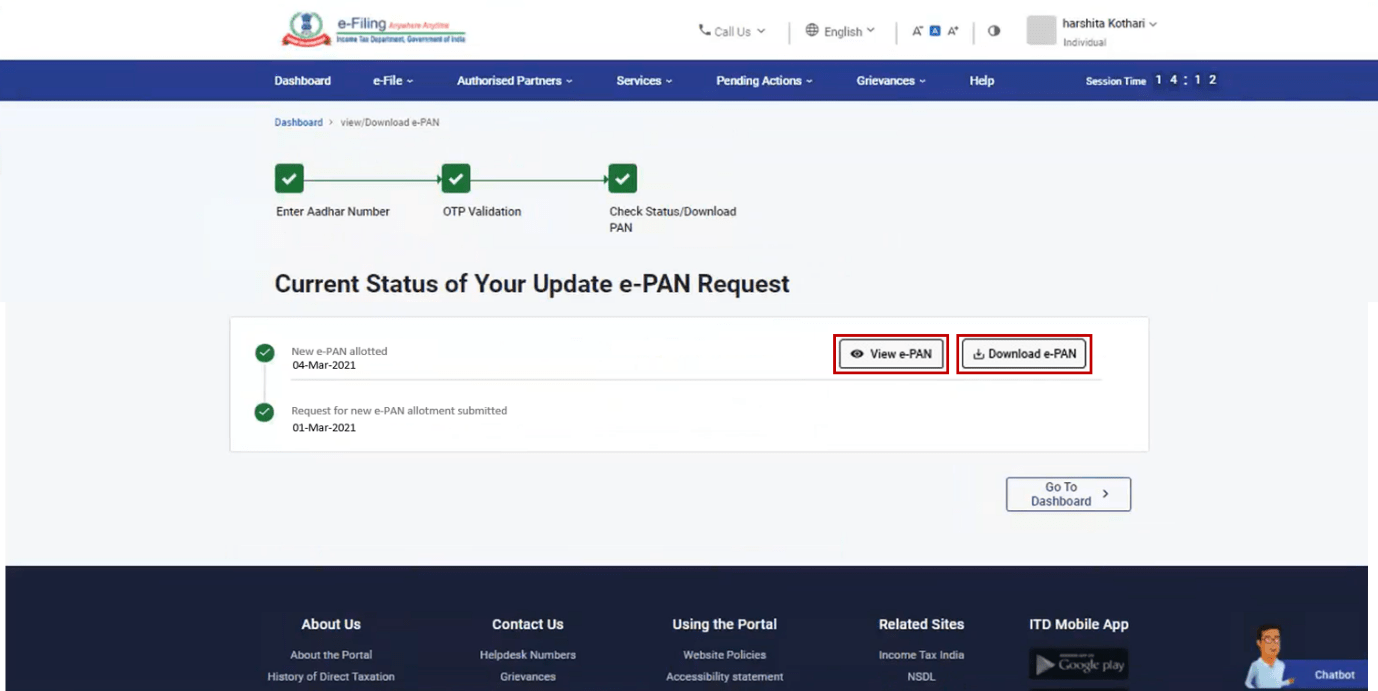
- Step 5: The status page will show your e-PAN request status. If it is generated, click on “View e-PAN” or “Download e-PAN.” You can also create an e-filing account here.
| Note: If your application status shows “Pending,” it means your e-PAN is being processed. Check back later using the same process. |
After Login
- Step 1: Log in to the e-Filing portal using your User ID and password (created after receiving your e-PAN).
- Step 2: After clicking on login, enter your ID (PAN/AADHAAR/USER ID) and next enter the password.
- Step 3: On your Dashboard, click “Services”, and from the dropdown menu click “View/Download e-PAN.”

- Step 4: Enter your 12-digit Aadhaar number and click “Continue.”
- Step 5: Enter the OTP received on your mobile and click “Continue.”
- Step 6: On the “View/Download e-PAN” page, you can view or download your e-PAN card.
Instant e-PAN FAQs
Instant e-PAN is a facility provided by the Income Tax Department that allows you to obtain a Permanent Account Number (PAN) instantly using your Aadhaar number.
Any individual who has a valid Aadhaar number and whose mobile number is registered with Aadhaar can apply for an Instant e-PAN.
No, the Instant e-PAN facility is provided free of cost by the Income Tax Department.
The Instant e-PAN is generated and issued within 10 minutes of successfully completing the application process.
No, the facility is available only to individuals who do not have a PAN. Having more than one PAN is illegal and subject to penalties.
Yes, the Instant e-PAN is valid for all purposes where a regular PAN is used.